“Petunjuk”
Table of Contents
- Introduction
- Getting Started
- HTML Structure
- CSS Files and Structure
- JavaScript
- Game Functions
- Game Assets
- XML File
- Build-in Edit Tools
- Question Templates
- Save XML with password
- Scoreboard
- Compatibility
- Sources and Credits
- Changelog
- Support Policy
A) Introduction - top
Quiz Game 2 is a HTML5 game with free general knowledge quiz questions and multiple choice answers, it is rebuild without canvas which can support responsive for landscape and portrait layout, and include the new fill in the blank and video question.
The ZIP package contains the game with 1200×650 resolution that scales to fit the whole screen device, but it may not be perfectly full screen.


B) Getting Started - top
To install the game just upload folder 'game' to your server. The game won't run locally with some browser like Chrome due to some security mode.
You need a website that runs PHP to make facebook share button work, and make sure to change Facebook Open Graph meta and Twitter meta in index.html, just replace [GAME_URL] to your game URL.
        <!-- for Facebook -->
        <meta property="og:image" content="[GAME_URL]/share.jpg" />
        <meta property="og:url" content="[GAME_URL]" />

        <!-- for Twitter -->
        <meta name="twitter:image" content="[GAME_URL]/share.jpg" />
You can easily customize game text and settings in game.js file
    var screenSettings = {
        stageW:1200, //game width
        stageH:650, //game height
        portraitW:380, //game portrait width
        portraitH:600, //game portrait height
        fitToScreen:true, //fit to browser screen
        maintainAspectRatio:true, //maintain aspect ratio
        viewportMode:{enable:false, viewport:"portrait", text:"Rotate your device
to portrait"}, //device viewport mode, portrait or landscape
    }

    var categorySettings = {
        status:true, //show/hide category select page
        allOption:true, //add ALL category select option
        allText:"All", //text for all category select option
        sort:true, //sort category alphatically, except All option always at last
        breadcrumb:" > ",//symbol for breadcrumb
        breadcrumbTop:"Back" //breadcrumb top level name
    };

    //question settings
    var questionSettings = {
        totalQuestionLimit:0, //set more than 0 to limit total questions,
        randomQuestion:true, //true or false to enable randomize questions
        revealAnswer:true, //enable reveal answer
        loader:"LOADING QUESTION...", //loader text display
        totalText:"[NUMBER]/[TOTAL]", //total question text display,
        showCorrectWrong:true, //enable show correct or wrong text
        explanation:true, //enable show explanation
        correctDisplayText:"That\"s Correct!",
        wrongDisplayText:"Incorrect!",
    };

    //answer settings
    var answerSettings = {
        randomAnswer:true, //true or false to enable randomize answer
        lists:true, //enable answer list style
        listsText:["a) ","b) ","c) ","d) ","e) ","f) ","g) ","h) "], //answer list style format, maximum 8
        animation:true, //enable answer animation
    };

    //timer settings
    var timerSettings = {
        status:true, //true or false to enable timer
        mode:"default", //default or countdown mode
        session:"all", //single for one questions, all for whole session
        timer:25000, //total timer for countdown mode
    };

    //question property
    var questionProperty = {
        fontSize:50,
        lineHeight:58,
        color:"#fff",
        top:25,
        left:5,
        width:90,
        height:30,
        align:"center"
    };

    //video property
    var videoProperty = {
        top:15,
        left:30,
        width:40,
        height:41,
        autoplay:true,
        controls:true
    };

    //answers property
    var answersProperty = {
        fontSize:40,
        lineHeight:40,
        color:"#fff",
        align:"center",
        width:30,
        height:14,
        offsetTop:-15
    };

    var answersButtonProperty = {
        status:true, //toggle answer button background
        roundNumber:15, //answer button background round corner number
        color:"#a2cd4a", //answer button background colour
        shadowColor:"#6fad4e", //answer button background shadow colour
        answerdColor:"#f89a31", //answered button background colour
        answerdShadowColor:"#dc4832", //answered button background shadow colour
        wrongColor:"#989898", //answered button background colour
        wrongShadowColor:"#666", //answered button background shadow colour
    };

    //audio settings
    var audioSettings = {
        questionDelay:300, //timer delay to play question audio
        answerDelay:100, //timer delay to play answer audio
    };

    //answers property
    var inputProperty = {
        fontSize:40,
        lineHeight:40,
        color:"#333",
        background:"#fff",
        wrongColor:"#333",
        wrongBackground:"#999",
        align:"center",
        width:20,
        height:12,
        top:50,
        left:40,
        offsetTop:-15
    };

    //drag drop settings
    var dragDropSettings = {
        revertSpeed:0.5, //revert speed
        listEnable:false, //enable drag answer list style
        droppedAnswerAgain:true, //enable drag answer again after dropped
        randomAnswer:true, //enable drag answer display in random sequence
        dragBorder:"#fff",
        dropStroke:"1px",
        dropBackground:""
    };

    //drag drop property
    var dropLabelProperty = {
        fontSize:50,
        lineHeight:50,
        color:"#fff",
        align:"right",
        offsetTop:-15
    };

    //group drop property
    var groupDropProperty = {
        border:"#fff",
        stroke:"1px",
        background:"",
        dropMax:4,
        dropWidth:40,
        dropHeight:30,
        dropOffLeft:1,
        dropOffTop:3,
        fontSize:50,
        lineHeight:50,
        color:"#fff",
        align:"right",
        offsetTop:-15
    };

    //correct or wrong property
    var correctWrongProperty = {
        fontSize:50,
        lineHeight:50,
        color:"#fff",
        align:"center",
        top:30,
        left:5,
        width:90,
        height:30
    };

    //explanation property
    var explanationProperty = {
        fontSize:35,
        lineHeight:35,
        color:"#fff",
        align:"center",
        top:45,
        left:5,
        width:90,
        height:10
    };

    //result settings
    var resultSettings = {
        mode:"score", //display result by "score" or "timer"
        reverse:false, //display result in reverse
        scoreText: "YOUR SCORE : [NUMBER]", //score text display
        timerText: "BEST TIME : [NUMBER]" //timer text display
    };

    //Social share, [SCORE] will replace with game score
    var shareSettings = {
        shareEnable:true, //toggle share
        shareTitle:"Highscore on Quiz Game 2 Game is [SCORE]pts", //social share score title
        shareMessage:"[SCORE] is mine new highscore on Quiz Game 2 Game! Try it now!", //social share score message
    }
If you wish to customize the question and answer via XML file, check out XML File section.
If you wish to customize the question and answer with build-in tool, check out Build-In Editor Tool section.
If you wish to check out question templates, check out Question Templates section.
If you wish to enable scoreboard, check out Scoreboard section.
The sound can be easily disabled to avoid compatibility issues in sound.js file:
var enableMobileSound = true;
C) HTML Structure - top
The page start with the loader wrapper that covering the whole screen in the body. It shows loader progress when calls the function initPreload()
        <!-- PERCENT LOADER START-->
    	<div id="mainLoader"><img src="assets/loader.png" /><br><span>0</span></div>
        <!-- PERCENT LOADER END-->
Follow by one HTML tag in the body. The game start initiatie by calls the main function of the game initMain().
        <!-- CONTENT START-->
        <div id="mainHolder">

        </div>
        <!-- CONTENT END-->
D) CSS Files and Structure - top
I'm using two CSS files in this game. The first one is a generic reset file. Many browser interpret the default behavior of html elements differently. By using a general reset CSS file, we can work round this. This file also contains some general styling, such as anchor tag colors, font-sizes, etc. Keep in mind, that these values might be overridden somewhere else in the file.
The second file contains all of the specific stylings for the page.
E) JavaScript - top
This game using Javascript files below.
-
jQuery is a cross-platform JavaScript library designed to simplify the client-side scripting of HTML.
-
Detect Mobile Browser is a open source scripts to detect mobile browsers and phones.
-
CreateJs plugin is a suite of modular libraries and tools which work together to create interactive content on open web technologies via HTML5.
-
TweenMax is an extremely fast, lightweight, and flexible animation tool that serves as the foundation of the GreenSock Animation Platform (GSAP).
-
The game have the following js files
- init.js : check if browser or device support
- loader.js : loader to load all game images
- main.js : initiate game setup and browser resize function
- mobile.js : mobile orientation change
- canvas.js : canvas setup and resize
- sound.js : sound event
- game.js : game play and logics
- plugins.js : additonal useful plugins
- init.js : check if browser or device support
Complete game flow:
- The index.html file start init.js for browser detection
- If browser is supported, init loader.js to start load asserts with loading progress
- For mobile the rotate instruction shows when device is in portrait view, detect by mobile.js
- When all asserts contained in "/assets" folder are loaded, the game start construct canvas.js from main.js thats shows game menu
- If user click the screen in game menu, the game will start category page with game.js
- If user click select category in category page, the game will start with first question
- If user choose the right answer, user will score point and move to next question
- If user choose the wrong answer, the game will move to next question
- If user did not answer the question on time, game result will shows
- When all the question is complete, game result will shows
- If user click the screen in game result, it will restart the game
F) Game Functions - top
The most important functions used for page.
-
checkBrowser()
This function is runs for browser detection
-
checkMobileEvent()
This function runs for mobile event
The most important functions used for game.
-
initMain()
This function build canvas
-
startGame()
This function start gameplay
-
stopGame()
This function stop gameplay
-
saveGame()
This function save game score
G) Game Assets - top
The game contain 'design' folder which include following:
- quizgame2_1200x650.psd - with layer folders below
- Option
- Result
- Game
- Category
- Landing
- Background
The folder 'assets' in 'game' folder contains all the images of the game that can be replaced. Is better to have the same size of the old ones if you want to reskin the game graphic without coding.
H) XML File - top
You can easily build or edit Question and Answer in questions.xml file
All Question and Answer are store in each XML item, sample code below:.
        <item>
            <category>IQ Questions</category>
            <landscape>
                <question type="text" top="17" audio="assets/sounds/questions/iq_q8.ogg"><![CDATA[If Bob sold 15 apples in a working week, what is the average number of apples he sells each day?]]></question>
                <answers correctAnswer="2">
                    <answer type="text" top="48" width="35" left="14" audio="assets/sounds/questions/iq_q8_a.ogg"><![CDATA[1]]></answer>
                    <answer top="48" type="text" left="51" width="35" audio="assets/sounds/questions/iq_q8_b.ogg"><![CDATA[3]]></answer>
                    <answer top="65" type="text" left="14" width="35" audio="assets/sounds/questions/iq_q8_c.ogg"><![CDATA[6]]></answer>
                    <answer top="65" type="text" left="51" width="35" audio="assets/sounds/questions/iq_q8_d.ogg"><![CDATA[15]]></answer>
                </answers>
                <inputs/>
                <explanation audio="assets/sounds/questions/iq_q8_explain.ogg"><![CDATA[ There are 5 days in a working week, so you divide 15 by 5 = 3. ]]></explanation>
                <videos left="10" top="30" autoplay="true" controls="true"><video type="video/mp4">assets/questions/mov_bbb.mp4</video></videos>
            </landscape>

            <portrait>
                <question type="text" top="12" fontSize="25" lineHeight="25" audio="assets/sounds/questions/iq_q8.ogg"><![CDATA[If Bob sold 15 apples in a working week, what is the average number of apples he sells each day?]]></question>
                <answers correctAnswer="2">
                    <answer type="text" width="90" height="10" top="35" fontSize="35" lineHeight="35" offsetTop="-15" audio="assets/sounds/questions/iq_q8_a.ogg"><![CDATA[1]]></answer>
                    <answer width="90" height="10" top="47" type="text" fontSize="35" lineHeight="35" offsetTop="-15" audio="assets/sounds/questions/iq_q8_b.ogg"><![CDATA[3]]></answer>
                    <answer width="90" height="10" top="59" type="text" fontSize="35" lineHeight="35" offsetTop="-15" audio="assets/sounds/questions/iq_q8_c.ogg"><![CDATA[6]]></answer>
                    <answer width="90" height="10" top="71" type="text" fontSize="35" lineHeight="35" offsetTop="-15" audio="assets/sounds/questions/iq_q8_d.ogg"><![CDATA[15]]></answer>
                </answers>
                <inputs/>
                <explanation type="text" fontSize="30" lineHeight="30" audio="assets/sounds/questions/iq_q8_explain.ogg"><![CDATA[ There are 5 days in a working week, so you divide 15 by 5 = 3. ]]></explanation>
                <video left="5" top="22" width="90" height="33" autoplay="true" controls="true">assets/questions/mov_bbb.mp4</video>
            </portrait>
        </item>
Below is the explanation of each most important XML elements:
- category - is to categories the type of question (eg. IQ Questions, Math Puzzles), the category name will be display in category page, leave it empty if categoryPage option is set to false.
<category>IQ Questions</category> - landscape, portrait - all questions value are seperate by two view mode which is landscape and portrait, each mode have their own values and settings
<landscape></landscape> <portrait></portrait> - question - the question must enter in between <![CDATA[ ]]> in xml so the data contained therein will not be parsed as XMLs
- type - attribute type can set to 'image' to load image as question instead of text, and the image path can insert into question element like below
<question type='image'>assets/questions/blank1.png</question> - lineHeight - attribute lineHeight can set the text line height (number only), this is optional when the question is too long to adjust the font size smaller, leave it empty to load default font size
- fontSize - attribute fontSize can set the text font size (number only), this is optional when the question is too long to adjust the font size smaller, leave it empty to load default font size
- color - attribute color can change the text color (hex only)
- align - attribute align can set the text align (left, center, right)
- top - attribute top can change the text top position (number only) in %
- left - attribute left can change the text left position (number only) in %
- width - attribute width can change the text width (number only) in %
- height - attribute height can change the text height (number only) in %
- audio - attribute audio is the audio file path for question, it must have MP3 and OGG file format for cross-browser compatible, only OGG format to be insert to XML data, it will auto change to MP3 if is not support.
- answers - the multiple choice or drag & drop answers can be insert here, maximum 8 answers
- correctAnswer - attribute correctAnswer is the right answer of the question (number only), for multiple choices answer can add in by comma (1,3,4)
*Note this correct answer atrribute is only for single or multiple choice answer
*Drag & drop questions answer is in ascending order in your answer list, you do not need this attribute
*Multiple drag in one drop area has it own correctAnswer attribute in group element, you do not need this attribute
- drag - attribute drag is the option to enable draggable and droppable question
- answer - the answer must enter in between <![CDATA[ ]]> in xml so the data contained therein will not be parsed as XMLs
- submit - attribute submit can set to a button to submit answer for multiple choice question
- type - attribute type can set to 'image' to load image as answer instead of text
- fontSize - attribute fontSize can set the text font size (number only), this is optional when the question is too long to adjust the font size smaller, leave it empty to load default font size
- lineHeight - attribute lineHeight can set the text line height (number only), this is optional when the question is too long to adjust the font size smaller, leave it empty to load default font size
- color - attribute color can change the text color (hex only)
- offsetTop - attribute offsetTop can set the text offsetTop for background button (number only) in %
- align - attribute align can set the text align (left, center, right)
- top - attribute top can change the text top position (number only) in %
- left - attribute left can change the text left position (number only) in %
- width - attribute width can change the text width (number only) in %
- height - attribute height can change the text height (number only) in %
- audio - attribute audio is the audio file path for question, it must have MP3 and OGG file format for cross-browser compatible, only OGG format to be insert to XML data, it will auto change to MP3 if is not support.
- dropLabelType - attribute type can set to 'image' to load image as label instead of text
- dropLabelText - label text or image path
- dropLabelFontSize - attribute fontSize can set the text font size (number only), this is optional when the question is too long to adjust the font size smaller, leave it empty to load default font size
- dropLabelLineHeight - attribute lineHeight can set the text line height (number only), this is optional when the question is too long to adjust the font size smaller, leave it empty to load default font size
- dropLabelColor - attribute color can change the text color (hex only)
- dropLabelOffsetTop - attribute offsetTop can set the text offsetTop for background button (number only) in %
- dropLabelAlign - attribute align can set the text align (left, center, right)
- dropLabelTop - attribute top can change the text top position (number only) in %
- dropLabelLeft - attribute left can change the text left position (number only) in %
- dropLabelWidth - attribute width can change the text width (number only) in %
- dropLabelHeight - attribute height can change the text height (number only) in %
- dropTop - attribute dropTop can change the droppable top position (number only) in %
- dropLeft - attribute dropLeft can change the droppable left position (number only) in %
- dropWidth - attribute dropWidth can change the droppable width (number only) in %
- dropHeight - attribute dropHeight can change the droppable height (number only) in %
- dropOffTop - attribute dropOffTop can change the droppable offset top position (number only) in %
- dropOffLeft - attribute dropOffLeft can change the droppable offset left position (number only) in %
- correctAnswer - attribute correctAnswer is the right answer of the question (number only), for multiple choices answer can add in by comma (1,3,4)
- groups - the multiple drag items in one drop area can be insert here, this is the element for drop area, drag item is still from answers element
- group - the drop label must enter in between <![CDATA[ ]]> in xml so the data contained therein will not be parsed as XMLs
- correctAnswer - attribute correctAnswer is the right answer of the drag item (string/number), for multiple choice answer can add in by comma (1,3,4)
- type - attribute type can set to 'image' to load image as label instead of text
- fontSize - attribute fontSize can set the text font size (number only), this is optional when the label is too long to adjust the font size smaller, leave it empty to load default font size
- lineHeight - attribute lineHeight can set the text line height (number only), this is optional when the label is too long to adjust the font size smaller, leave it empty to load default font size
- color - attribute color can change the text color (hex only)
- offsetTop - attribute offsetTop can set the text offsetTop for label (number only) in %
- align - attribute align can set the text align (left, center, right)
- top - attribute top can change the text top position (number only) in %
- left - attribute left can change the text left position (number only) in %
- width - attribute width can change the text width (number only) in %
- height - attribute height can change the text height (number only) in %
- audio - attribute audio is the audio file path for question, it must have MP3 and OGG file format for cross-browser compatible, only OGG format to be insert to XML data, it will auto change to MP3 if is not support.
- dropMax - attribute dropMax is the maximum drop items
- dropTop - attribute dropTop can change the droppable top position (number only) in %
- dropLeft - attribute dropLeft can change the droppable left position (number only) in %
- dropWidth - attribute dropWidth can change the droppable width (number only) in %
- dropHeight - attribute dropHeight can change the droppable height (number only) in %
- dropOffTop - attribute dropOffTop can change the droppable offset top position (number only) in %
- dropOffLeft - attribute dropOffLeft can change the droppable offset left position (number only) in %
- inputs - the fill in the blank answers can be insert here
- input - the input must enter in between <![CDATA[ ]]> in xml so the data contained therein will not be parsed as XMLs
- correctAnswer - attribute correctAnswer is the right answer of the question (string/number), use comma for multiple correct answers eg.(45,25)
- submit - attribute submit can set to a button to submit answer when done
- type - attribute type can set to 'blank, image, text' (blank for input, text or image for submit button)
- fontSize - attribute fontSize can set the text font size (number only), this is optional when the question is too long to adjust the font size smaller, leave it empty to load default font size
- lineHeight - attribute lineHeight can set the text line height (number only), this is optional when the question is too long to adjust the font size smaller, leave it empty to load default font size
- color - attribute color can change the text color (hex only)
- bacgkround - attribute bacgkround can change the input bacgkround color (hex only)
- offsetTop - attribute offsetTop can set the text offsetTop for background button (number only) in %
- align - attribute align can set the text align (left, center, right)
- top - attribute top can change the text top position (number only) in %
- left - attribute left can change the text left position (number only) in %
- width - attribute width can change the text width (number only) in %
- height - attribute height can change the text height (number only) in %
- audio - attribute audio is the audio file path for question, it must have MP3 and OGG file format for cross-browser compatible, only OGG format to be insert to XML data, it will auto change to MP3 if is not support.
- videos - the videos can be insert here
- embed - html video tag or youtube embed (html, youtube)
- top - attribute top can change the video top position (number only) in %
- left - attribute left can change the video left position (number only) in %
- width - attribute width can change the video width (number only) in %
- height - attribute height can change the video height (number only) in %
- autoplay - attribute autoplay is to autoplay the video.
- controls - attribute controls is to show/hide the video player controls.
- video - the video path can be insert here, most browser can support mp4 video format.
- type - video format type (video/mp4, video/webm, video/ogg)
- src - video source file
* For youtube embed must enter in between in xml so the data contained therein will not be parsed as XMLs
- explanation - the explanation can be insert here in between <![CDATA[ ]]> in xml so the data contained therein will not be parsed as XMLs
- type - attribute type can set to 'image' to load image as answer instead of text
- fontSize - attribute fontSize can set the text font size (number only), this is optional when the question is too long to adjust the font size smaller, leave it empty to load default font size
- lineHeight - attribute lineHeight can set the text line height (number only), this is optional when the question is too long to adjust the font size smaller, leave it empty to load default font size
- color - attribute color can change the text color (hex only)
- align - attribute align can set the text align (left, center, right)
- top - attribute top can change the text top position (number only) in %
- left - attribute left can change the text left position (number only) in %
- width - attribute width can change the text width (number only) in %
- height - attribute height can change the text height (number only) in %
- audio - attribute audio is the audio file path for explanation, it must have MP3 and OGG file format for cross-browser compatible, only OGG format to be insert to XML data, it will auto change to MP3 if is not support.
- background - the background image can be insert here
- top - attribute top can change the text top position (number only) in %
- left - attribute left can change the text left position (number only) in %
- width - attribute width can change the text width (number only) in %
- height - attribute height can change the text height (number only) in %
#IMPORTANS:
- Each questions must only have either answers/inputs only one of these settings, it will not run with both
- For multiple choice answers it must have at least one submit button for user to submit answer
- For input it must have at least one type of BLANK and a submit button for user to submit answer
- For drag and drop answers it must have at least one submit button for user to submit answer
- Submit button must be the last answer item when random answer option is enable
You can add category thumbnail with format below.
        <category>
            <thumb name="IQ Questions">assets/item_thumb_1.png</thumb>
            <thumb name="Math Puzzles">assets/item_thumb_2.png</thumb>
            <thumb name="Subcategory">assets/item_thumb_2.png</thumb>
            <thumb name="Subcategory 2" parent="Subcategory">assets/item_thumb_2.png</thumb>
            <thumb name="All">assets/item_thumb_3.png</thumb>
        </category>
- name - the category name to match for question's category to grap thumbnail, must be unique name and case sensitive
- parent - parent category name
- Follow by the image path
I) Build-in Edit Tools - top
This is the section where you can preview or edit the question with the tool by running edit.html.
1) Basic Options

- Select the viewport mode you want to edit.
- Select the questions you want to edit.
- Additionally you can remove, sort or add new questions.
- Edit your question (Category, Question, Answers (Multiple, Input, Drag & Drop), Explanation).
- Generate the new XML, copy and replace into questions.xml file
2) Sort question list

3) Add new questions

You may check out Question Templates section.
4) Edit Questions

- Edit video.
- Edit question category.
- Select question type and insert question text or image path.
- Insert question property to adjust.
- Insert question audio file path, it must have MP3 and OGG file format for cross-browser compatible, only OGG format to be insert to XML data, it will auto change to MP3 if is not support
- Preview questions to save.
5) Edit Video

- Add multple video format for browser support.
- Insert video property to adjust.
- Preview video to save.
6) Edit Answers

- Toggle draggable option or insert correct answer for single/multiple choice.
- Select answer to edit, additionaly can add, remove and sort answers.
-
Toggle submit button for multiple choice and draggable answer.
*For multiple choice answers it must have at least one submit button for user to submit answer
*Submit button must be the last answer item when random answer option is enable - Select answer type and insert answer text or image path.
- Insert answer property to adjust.
- Insert answer audio file path, it must have MP3 and OGG file format for cross-browser compatible, only OGG format to be insert to XML data, it will auto change to MP3 if is not support
- Preview answer to save.
7) Edit Draggable & Droppable

- For draggable answers able to edit draggable and droppable option.
- Insert drop label property to adjust.
- Insert drop area property to adjust.
8) Edit Draggable & Droppable (Multiple items)


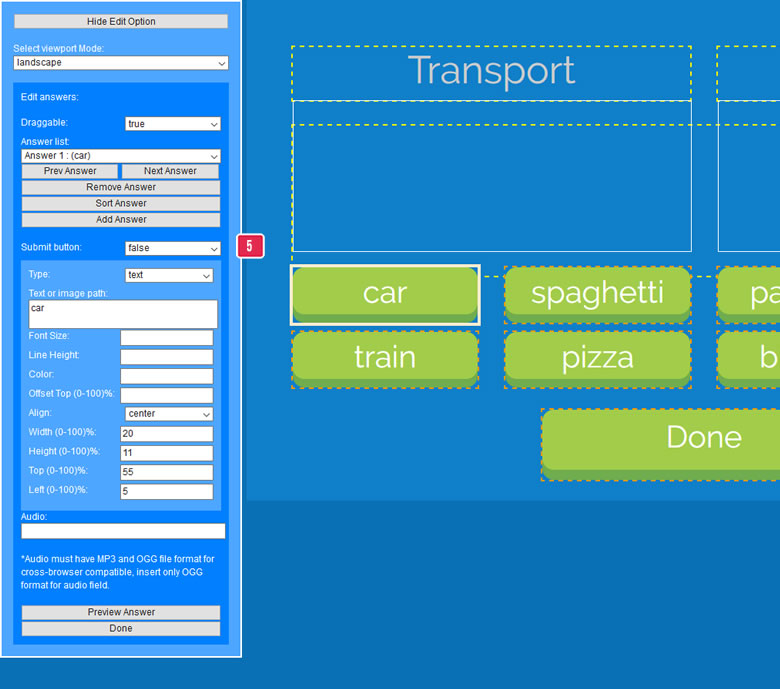
- These can be single or multiple draggable and droppable, first create droppable area and second for draggable item
- Select drop area to edit, additionaly can add, remove and sort drop area.
- Insert drop label property to adjust.
- Insert drop area property to adjust.
- Insert answer property to adjust.
9) Edit inputs

- Select input to edit, additionaly can add, remove sort inputs.
- Select input type and insert input text or image path.
*It must have at least one submit button for user to submit answer
- Insert input correct answer and property to adjust.
- Preview input to save.
10) Edit Explanation

- Select explanation type and insert explanation text or image path.
- Insert explanation property to adjust.
- Insert explanation audio file path, it must have MP3 and OGG file format for cross-browser compatible, only OGG format to be insert to XML data, it will auto change to MP3 if is not support
- Preview explanation to save.
11) Edit Background

- Insert image path.
- Insert background property to adjust.
- Preview background to save.
J) Question Templates - top
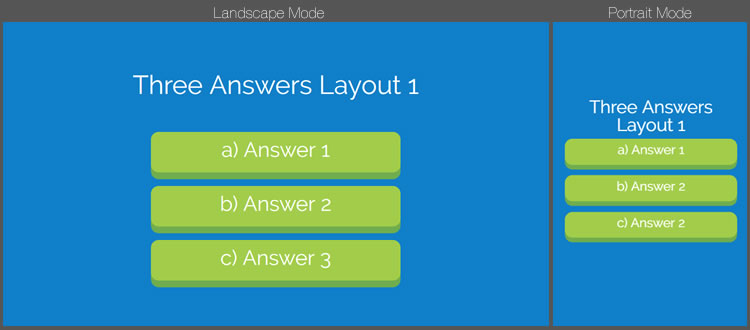
There are total 22 type of templates:




K) Save XML with password - top
Build-In Editor Tool come with the 'Save XML' button, follow steps below to use the feature:
- First open save.php and change to the new password, default password is 12345.
It is important to change the new password else anyone can open edit and save your XML file.$savePassord = '12345'; - In the same save.php file, enable the save feature by changing $saveEnable to true.
$saveEnable = true; - Set the questions.xml file permissions to 775 using your FTP software.
- Start the Build-In Editor Tool, clicking the 'Save XML' button will prompt to enter password to save.
L) Scoreboard - top
Scoreboard is a option where user can submit score and view top 10 leaderboard, follow the steps below to setup and run scoreboard.
1) Server setup
Create new database in cPanel
- In cPanel, select MySQL Database Wizard from the Databases section.
- Enter a name for the new database you wish to create and continue to the next step.
- Enter a username and password to create the database user account and continue to the next step.
- Select All Privileges to set security permissions the user has to the database and continue to the next step.
Add new table in cPanel
- In cPanel, select PhpMyAdmin tool from the Databases section.
- Click and open the newly create database and run sql query below to create new table
CREATE TABLE quizgame2_scores (
id INT(6) UNSIGNED AUTO_INCREMENT PRIMARY KEY,
name VARCHAR(30) NOT NULL DEFAULT 'anonymous',
email VARCHAR(30) NOT NULL,
type VARCHAR(30) NOT NULL,
score INT(100) UNSIGNED NOT NULL DEFAULT 0,
date TIMESTAMP DEFAULT CURRENT_TIMESTAMP
) CHARSET=utf8 DEFAULT COLLATE utf8_unicode_ci;
Configuration for database access
- Open dbconn.php in game folder and change the settings to your newly created database info
    $host = "localhost"; // MySQL hostname
    $dbUserName = "root"; // MySQL database username
    $dbPwd = ""; // MySQL database password
    $dbName = "scoreboard"; // The name of the database
    $table = "quizgame2_scores"; //the name of the table
2) Settings
Enable the scoreboard by changing 'displayScoreBoard' to true in score.js, you can easily customize other settings in here
    var scoreboardSettings = {
        displayScoreBoard:false, //toggle submit and scoreboard button
        scoreBoardTitle:"TOP 10 Scoreboard", //text for scoreboard title
        scoreRank_arr:["1st","2nd","3rd","4th","5th","6th","7th","8th","9th","10th"], //scoreboard ranking list
        totalScorePage:1, //total score pages, .e.g. 2 for 20 listing
        userIDType:"email", //user ID type 'email' or 'mobile' field
        mobileFormat:{
                            matches:"999-99999999", //mobile format
                            minLength:10, //mobile min length
                            maxLength:12 //mobile max length
                        },
        submitTitle:"Submit your score", //text for submit title
        score_arr:[{col:"RANK", percent:8, align:"center"},
                    {col:"NAME", percent:42, align:"left"},
                    {col:"CATEGORY", percent:20, align:"center"},
                    {col:"SCORE", percent:30, align:"center"}]
    }
M) Compatibility - top
This game is build for Desktop browsers that support HTML5 canvas. Any mobile/tablet should work in landscape view, but they are not officially supported.
N) Sources and Credits - top
I've used the following font and sound files as listed.
- button 13.wav from file bubaproducer
- SFX UI Button Click from file suntemple
- ui interface neutral from file JavierZumer
- buttonchime02up.wav from file JustinBW
- Confirm - HarpEPianoEdit.mp3 from file ying16
- Answer and Description audio are record from Google Translate
O) Changelog - top
Version 3.9- Added scoreboard phone field option
- Fixed editor tool issue
- Added scoreboard format
- Added scoreboard loader
- Oraganized scoreboard folder
- Changed scoreboard settings
- Fixed explanation issue
- Fixed viewport rotate issue
- Fixed category thumbnail
- Fixed input reveal answer
- Fixed viewport rotate
- Option to show correct/wrong status
- Reveal answer for inputs
- View scoreboard from options
- View scoreboard for all category
- Compatible with Quiz Membership System add-on
- Option to add subcategory
- Input answer can have multiple answers
- Fixed scoreboard missing button
- Added background option
- Added multiple drag and drop option
- Build-in Editor Tool UI improvements (Able to drag and resize)
- Fixed answer issue
- Fixed multiple answer issue
- Fixed category after removed
- Option to set device viewport mode
- Added timer options
- Added result options
- Update Google to Whatsapp share
- Fixed video issue
- Added youtube video
- Drag & drop question (multiple answers with one correct answer)
- Build-in Editor Tool UI improvements
- Fixed Build-in Editor issues
- Fixed next and prev questions button
- Added option to drag answer once dropped (Drag & Drop question)
- Added option to randomize answer (Drag & Drop question)
- Fixed category listing
- Build-in Editor Tool UI improvements
- Build-in Editor Tool sortable answer (select, drag & drop, input)
- Fixed Build-in Editor Tool issues
- Drag & drop option fully support text (question, draggable answer, droppable label)
- Convert assets PNG to SVG (Scalable Vector Graphics)
- Added option for scoreboard to show more than 10 listing
- Fixed Build-in Editor Tool change viewport issue
- Added category option in Build-in Editor Tool
- Fixed audio not playing in Chrome browser
- Fixed Build-in Editor Tool when no video
- Added drag and drop option
- Fixed output XML for Build-in Editor Tool
- Added multiple choices option
P) Support Policy - top
Check out support policy here.